- الصفحة الرئيسية /
- ألعاب الفيديو /
- PC /
- إكسسوارات /
- Controllers /
- Flight Controls /
- Logitech G Pro Flight Instrument Panel
0 ratings






منتج #:
60253792
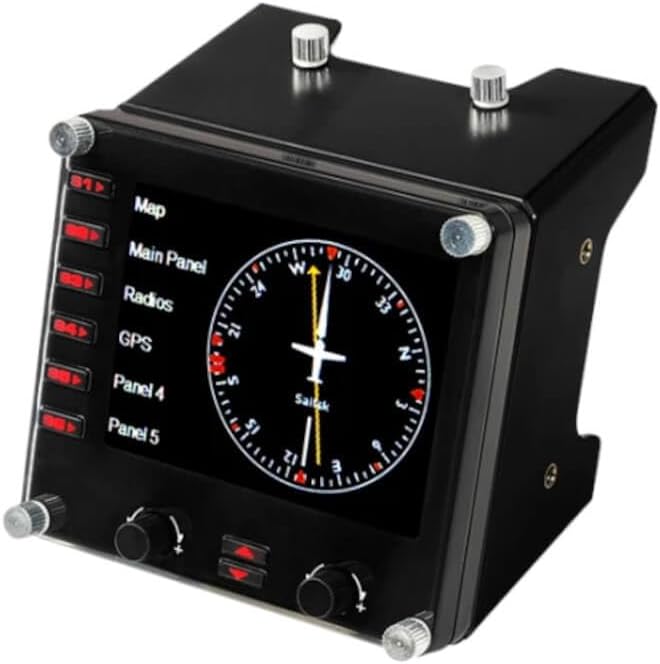
Logitech G Pro Flight Instrument Panel
87% من المشترين سيوصون بهذا المنتج لصديق
منتج #:
60253792
IQD 349485
تفاصيل السعر
باستثناء رسوم الشحن والجمارك ( سيتم احتساب رسوم الشحن والجمارك عند إتمام الشراء )
*سيتم استيراد جميع العناصر من أمريكا
متوفر فى المخزون
 مستورد من متجر USA
كمية:
بقي 3 فقط من المنتج في المخزن.
اطلب الآن واحصل عليه حول الخميس, أكتوبر 15
معاملة آمنة
تعمل يوباي جاهدة لحماية أمنك وخصوصيتك. يضمن نظام أمان الدفع المتقدم لدينا السرية من خلال تشفير معلوماتك أثناء النقل باستخدام بروتوكولات AES (معايير التشفير المتقدمة) وSSL (طبقة المنافذ الآمنة). تفاصيل الدفع الخاصة بك آمنة بنسبة %100 لأننا لا نشارك تفاصيل الدفع الخاصة بك مع بائعين تابعين لجهات خارجية
أفضل شركائنا اللوجستيين


Upgrade your flight simulation experience with the Saitek Pro Flight Instrument Panel

شحن
سريع

استرجاع
مجاني*

تغليف آمن

منتجات أصلية %100

الامتثال لمعيار PCI DSS

حاصل على شهادة ISO 27001



Note: Step Down Voltage Transformer required for using electronics products of أمريكا store (110-120). Recommended power converters اشتري الآن.


مايفيد
Realistic Display
The G Pro Flight Instrument Panel features an authentic LCD display that provides real-time readability for flight data, enhancing immersion and offering a genuine cockpit experience for flight simulation enthusiasts.
Modular Design
Easily add or customize your setup with a modular design that perfectly integrates with Logitech's range of flight simulation hardware, allowing users to create a tailored simulation environment that fits their needs.
Compatibility
Compatible with a variety of flight simulation software, this instrument panel delivers a seamless user experience across platforms, ensuring that dedicated pilots can integrate it effortlessly into their existing setups.
تفاصيل المنتج
| Compatible Devices | Windows 7, Windows 8.1, Windows 10, Windows 11 |
| Controller Type | Joystick |
| Connectivity Technology | USB |
| Additional Features | Motion Sensing |
| Button Quantity | 6 |
| Hardware Platform | PC |
| Power Source | Information Not Available |
| Item Weight | 14.11 ounces (400.02 grams) |
| Package Quantity | 1 |
| Item Dimensions | 5.71 x 4.65 x 3.94 inches (14.5 x 11.8 x 10 cm) |
| Color | Black |
| Brand Name | Logitech G |
| Model Name | Pro Flight |
| Manufacturer | Logitech, Inc |
| Global Trade Identification Number | 10097855127928 |
| Item Highlight | Colorful 3.5-inch LCD screen, 15 different readouts, realistic cockpit setups, mounting bracket included |
| UPC | 097855127921 |
| External Testing Certification | Não aplicável |
| Included Components | Mounting Bracket, Pro Flight Instrument Panel, QSG, Screws |
| Item Type Name | Logitech G Pro Flight Instrument Panel (945-000027) |
| Model Number | 945-000027 |
| Manufacturer Part Number | 945-000027 |
| Brand | Logitech G |
ما بداخل الصندوق
Pro Flight Instrument Panel
Mounting Bracket
Screws
QSG
من يجب أن يشتري؟

-
Flight Sim Enthusiasts
Ideal for dedicated flight simulation users who want a realistic cockpit experience with multiple instrument displays.
-
Training Pilots
Useful for trainee pilots needing to practice navigation skills and understand instrument readings in a simulated environment.
-
Multi-Display Setup
Perfect for users with multi-monitor setups, enhancing their simulation by providing additional instrument data at a glance.

-
Casual Gamers
Not suitable for occasional gamers who may not fully utilize all features of a professional flight instrument panel.
وصف المنتج
هل لديك أي استفسار؟ تحدث معنا
أسئلة العملاء & الإجابات
-
سؤال:
What is the Logitech G USB Pro Flight Instrument Panel?
إجابه: The Logitech G USB Pro Flight Instrument Panel is a versatile and easy-to-use cockpit instrument that enhances flight simulation experiences. It features a customizable LCD display that presents essential flight data, allowing pilots to monitor various performance metrics at a glance. With its plug-and-play functionality, it can be integrated seamlessly into most flight simulation software. This panel is ideal for enthusiasts and professional pilots alike, enhancing realism and providing a comprehensive view of important flight information during simulations. -
سؤال:
How do I integrate the Logitech G USB Pro Flight Instrument Panel with flight simulator software?
إجابه: Integrating the Logitech G USB Pro Flight Instrument Panel is straightforward. Simply connect it to your computer via a USB port, and most flight simulations, like Microsoft Flight Simulator or X-Plane, will recognize it automatically. You can customize the display settings through the simulation software or Logitech's G HUB software for tailored instrument readings. This functionality allows you to maximize your flight experience, giving you real-time data about altitude, speed, and navigation, making for a more immersive simulation. -
سؤال:
Can I use multiple Logitech G USB Pro Flight Instrument Panels together?
إجابه: Yes, you can connect multiple Logitech G USB Pro Flight Instrument Panels to your system, creating a comprehensive cockpit setup. This is especially beneficial for serious flight enthusiasts or professionals who want to simulate a full cockpit environment. By using multiple panels, you can monitor various instruments simultaneously, such as altitude, airspeed, or navigation readings, enhancing your operational efficiency and making your flight experience more engaging and realistic. -
سؤال:
What types of display options does the Logitech G USB Pro Flight Instrument Panel offer?
إجابه: The Logitech G USB Pro Flight Instrument Panel features a multi-function LCD that can display up to 15 different types of instrument readings. Users can customize the display for gauges like altitude, airspeed, heading, and more, allowing them to tailor the information to their specific flying needs. This flexibility ensures that whether you're flying commercial airliners or personal aircraft in simulation, you have the relevant data right in front of you for efficient monitoring and performance assessment. -
سؤال:
Is the Logitech G USB Pro Flight Instrument Panel compatible with VR setups?
إجابه: The Logitech G USB Pro Flight Instrument Panel can be used in conjunction with Virtual Reality (VR) setups, offering a tactile way to monitor flight data without taking your eyes off the simulated environment. While you'll need to ensure that your flight simulator supports both VR and the panel, this combination allows pilots to enjoy a truly immersive experience. This setup is perfect for those looking to elevate their flight simulation experience and manage cockpit instruments using real-world functionality. -
سؤال:
What are the key features of the Logitech G USB Pro Flight Instrument Panel?
إجابه: Key features of the Logitech G USB Pro Flight Instrument Panel include a high-resolution LCD display, multiple customizable instrument readings, and easy USB connectivity. It also includes buttons for direct adjustable settings and can function independently or as part of a multi-panel setup. These features are designed to enhance the realism and detail in flight simulations, making it a favorite among gamers and pilots seeking to replicate the cockpit experience as closely as possible. -
سؤال:
Does the Logitech G USB Pro Flight Instrument Panel require additional software?
إجابه: While the Logitech G USB Pro Flight Instrument Panel operates effectively with just a USB connection, using Logitech's G HUB software can enhance its functionality. The software allows you to customize the panel’s display and set up instruments according to your flight simulation needs. This customization can improve performance and realism in your flight experience, making it more tailored to your particular flying style and preferences in various simulation environments. -
سؤال:
What should I consider when setting up the Logitech G USB Pro Flight Instrument Panel?
إجابه: When setting up the Logitech G USB Pro Flight Instrument Panel, consider the available USB ports on your computer, as well as the specific flight simulator software you plan to use. Arrange the panel in a way that is ergonomic and easily viewable during your simulation sessions. Also, exploring the customization options through the G HUB software can significantly enhance your setup, providing you with real-time data tailored to your preferences, making it an integral part of your flight simulation setup. -
سؤال:
How does the Logitech G USB Pro Flight Instrument Panel enhance flight simulation realism?
إجابه: The Logitech G USB Pro Flight Instrument Panel enhances flight simulation realism by providing real-time, customizable data displays that mimic actual cockpit instruments. This level of detail helps pilots, whether virtual or real, to better interpret flight conditions and improve their situational awareness. Adding this panel to your setup allows for more effective monitoring of critical flight parameters, which is particularly useful during complex flight operations or simulations of challenging flight scenarios. -
سؤال:
Where can I buy the Logitech G USB Pro Flight Instrument Panel?
إجابه: You can purchase the Logitech G USB Pro Flight Instrument Panel from Ubuy in Iraq. Ubuy offers a wide selection of Logitech products, ensuring that you get the instrument panel delivered conveniently to your location. As a trusted online retailer, Ubuy provides an efficient shopping experience for all your flight simulation needs.
Logitech G Flight Controls 945-000027 Editorial Review
Logitech G Pro Flight Instrument Panel is designed for flight simulation enthusiasts, featuring high-quality gauges and an easy installation process that quickly integrates with simulator software when paired with third-party drivers like SPAD.Next. Many users have attested to its solid build quality and responsiveness once correctly configured, although initial setup can be a hurdle for those unaware that standard drivers may not suffice on Windows 11. The panel accommodates a variety of flight simulation software and offers a responsive display, making it a valuable tool for players. Overall, while there are some concerns regarding driver support, it remains a favorite for enhancing flight simulation experiences.
مراجعات العملاء وتقييماتهم
498 تقييمات العملاء
-
5 نجمة
59%
-
4 نجمة
16%
-
3 نجمة
9%
-
2 نجمة
4%
-
1 نجمة
12%
أضف تقييم لهذا المنتج
شارك أفكارك مع عملاء آخرين
إيجابيات
- Solid build quality for durability
- Wide range of gauges available
- Easy installation with the right software
- Excellent update rates with no visible lag
- Compatible with various simulator platforms
سلبيات
- Requires third-party software for optimal functionality
منصة موثوقة وثقة كاملة للمشتري

JK
Jasmin
مشتري موثّق
“Great products and very good service: very easy and very fast international delivery.”
9 September 2026 · عبر Trustpilot
AG
Anke
مشتري موثّق
“Wonderful online shopping experience, smooth transaction from the start. Payment method works conveniently and delivery is unexpectedly fast and reliable. You go the extra mile for service. What makes this even more amazing, you deliver to Namibia. I will remain a happy Ubuy customer and will increase my purchases for sure! Thank you!”
10 September 2026 · عبر Trustpilot
H
Hazel
مشتري موثّق
“Very easy to find the products what you need, and so fast delivery, that’s why I highly recommended to others costumers to used ubuy.”
10 September 2026 · عبر Trustpilot
O
Opaleye
مشتري موثّق
“I received exactly what I ordered I was skeptical about your site because that was my first time to order. But the order came timely and neatly packaged. I was not disappointed. Thank you.”
11 September 2026 · عبر Trustpilot
AC
Adele
مشتري موثّق
“Easy to find and order what you want on the website. Delivery is quick to the UK”
8 September 2026 · عبر Trustpilot
الخروج الآمن
شحن عالمي
إسترجاع سهل
منتجات أصلية
تاريخ سعر المنتج
معلومات مهمة
- القيود: بالنسبة للمنتجات التي يتم شحنها دولياً، يُرجى ملاحظة أن أي ضمان من الشركة المصنعة قد لا يكون صالحاً؛ قد لا تتوفر خيارات خدمة الشركة المصنعة؛ قد لا تكون أدلة المنتج والتعليمات وتحذيرات السلامة مكتوبة بلغة بلد المقصد؛ قد لا يتم تصميم المنتجات (والمواد المصاحبة لها) وفقاً لمعايير بلد الوجهة والمواصفات ومتطلبات الملصقات؛ وقد لا تتوافق المنتجات مع الجهد الكهربي المستخدم في بلد الوجهة والمعايير الكهربائية الأخرى (تتطلب استخدام محوّل كهربي أو جهاز تحويل إذا كان ذلك مناسباً). المستلم مسؤول عن ضمان إمكانية استيراد المنتج بشكل قانوني إلى بلد الوجهة. عند الطلب من يوباي أو الشركات التابعة لها، يكون المستلم هو المستورد المسجل ويجب أن يلتزم بجميع القوانين واللوائح الخاصة ببلد الوجهة.
- ليست كل المنتجات المدرجة على يوباي معروضة للبيع، لأن يوباي هو محرك بحث عالمي. المنتجات تخضع للوائح التصدير / التجارة.
IQD 349485
اطلب الآن واحصل عليه حول الخميس, أكتوبر 15
هذا المنتج غير ممنوع في بلدي. (الرجاء الضغط على الرابط أعلاه إذا لم يكن هذا المنتج ممنوعاً في بلدك ، لذلك سيقوم فريقنا بمراجعته والسماح به.)
كمية:
بقي 3 فقط من المنتج في المخزن.
معاملة آمنة
نوفر لك مدفوعات مشفّرة، وحماية متكاملة للمشتري، مع الالتزام بمعايير PCI DSS وشهادة ISO 27001:2022 لضمان أعلى مستويات الأمان في كل عملية شراء.
أفضل شركائنا اللوجستيين
أسرع توصيل عبر الحدود
المميزات والفوائد
- Colorful 3.5-inch LCD screen
- Toggle between 15 different displays
- Real-time access to important aircraft information
- True multi-functional device
- Automatically updates and reacts to software events
- Displays real-time cockpit instrument information
ضمان Ubuy
تسوّق بثقة مع منتجات أصلية %100، ومدفوعات آمنة متوافقة مع معيار PCI DSS، وحماية بيانات معتمدة وفق ISO 27001، وشحن دولي سريع، وإرجاع مجاني*، وتغليف آمن لكل طلب.